title: Qwen Image Layered - Revolutionary AI Image Generation with Layer Decomposition Technology slug: qwen-image-layered-en description: Comprehensive guide to Qwen Image Layered, the revolutionary AI model that automatically decomposes images into editable RGBA layers. Explore intelligent layer decomposition, flexible configuration, technical architecture, practical applications, and integration workflows for professional image editing. category: AI Tools tags: ['qwen image layered', 'ai image generation', 'layer decomposition', 'rgba layers', 'image editing', 'ai tools'] author: Tech Editorial Team coverUrl: /images/blog/qwen-image-layered.jpg locale: en status: online
Qwen Image Layered: Revolutionary AI Image Generation with Layer Decomposition Technology
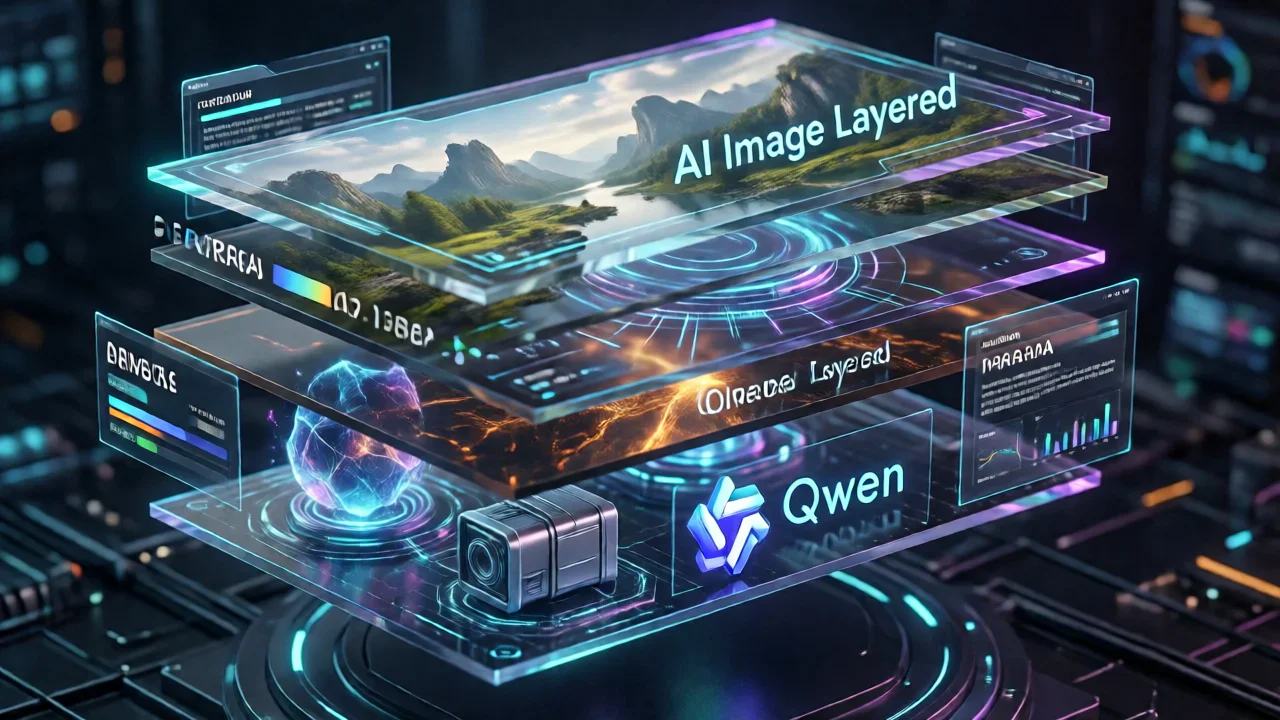
The landscape of AI image generation has witnessed a groundbreaking innovation with the release of Qwen Image Layered in December 2025. Developed by Alibaba's Qwen team, this revolutionary model introduces a paradigm shift in how we create and edit AI-generated images by enabling automatic decomposition into independent RGBA layers.
What is Qwen Image Layered?
Qwen Image Layered is an advanced AI model that transforms the traditional approach to image generation. Unlike conventional AI image generators that produce flat, single-layer outputs, Qwen Image Layered automatically breaks down images into multiple independent RGBA (Red, Green, Blue, Alpha) layers. This innovative approach brings Photoshop-like editing capabilities directly into the AI generation process.
Released under the Apache 2.0 license, the model has quickly gained traction in the AI community, accumulating over 23,000 downloads per month and 930 likes on Hugging Face. The technology is backed by comprehensive research published in arXiv paper 2512.15603.
Core Features and Capabilities
1. Intelligent Layer Decomposition
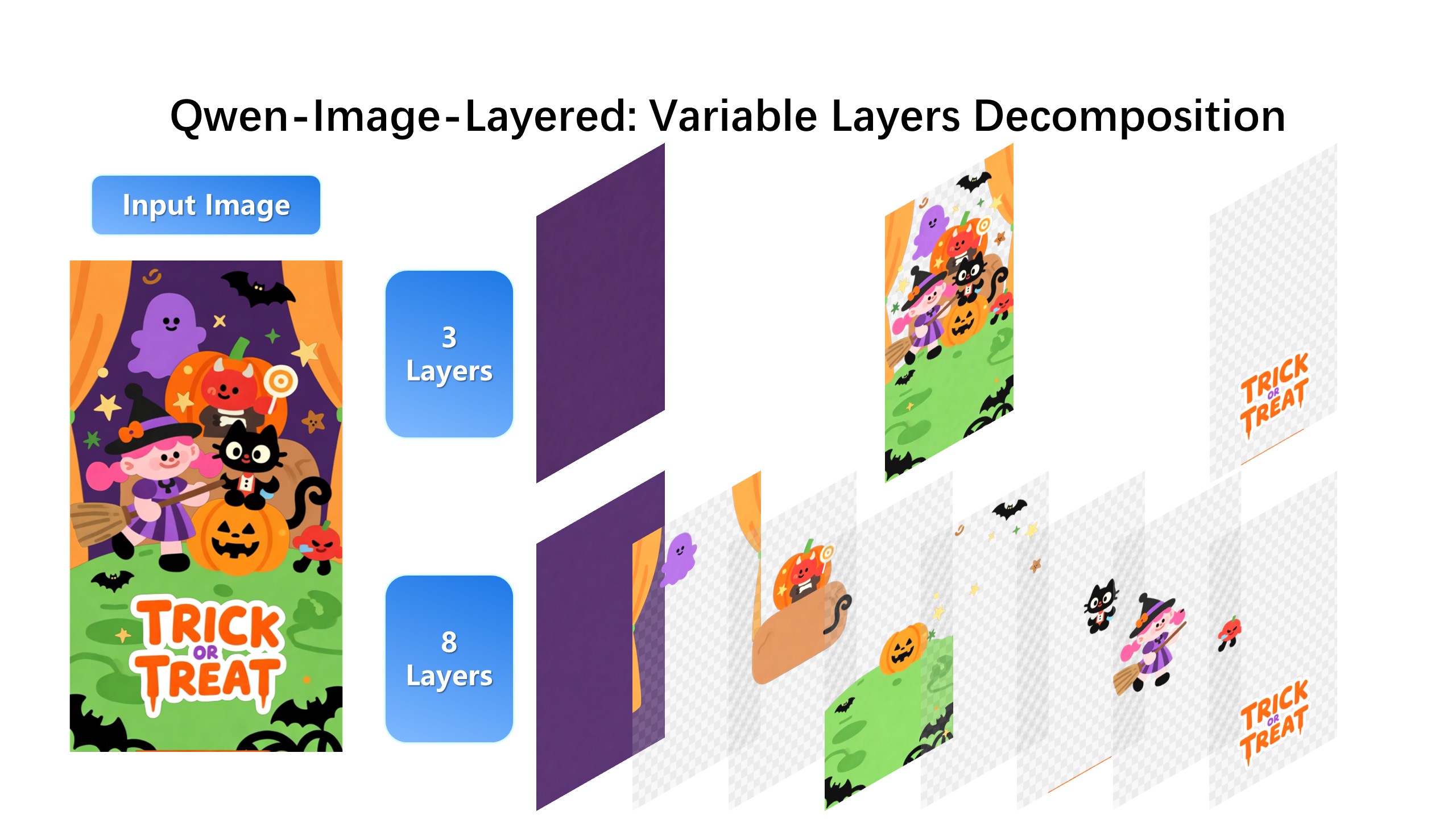
The standout feature of Qwen Image Layered is its ability to decompose images into semantically meaningful layers. Each layer isolates specific components such as:
- Foreground objects: Characters, products, or main subjects
- Background elements: Scenery, environments, or contextual settings
- Text and graphics: Overlaid text, logos, or design elements
- Effects and details: Shadows, highlights, or decorative elements
This decomposition isn't arbitrary—the model intelligently identifies semantic and structural components, ensuring each layer contains logically grouped visual elements.
2. Flexible Layer Configuration
Qwen Image Layered offers remarkable flexibility in layer management:
- Variable layer count: Generate anywhere from 3 to 8+ layers depending on image complexity
- Recursive decomposition: Any generated layer can be further decomposed into sub-layers
- Adaptive processing: The model automatically adjusts layer distribution based on image content
This flexibility makes Qwen Image Layered suitable for projects ranging from simple logo designs to complex multi-element compositions.
3. Independent Layer Editing
Once an image is decomposed, each layer becomes independently editable without affecting other content. This enables precise operations including:
- Recoloring: Change colors of specific objects while preserving others
- Resizing: Scale objects up or down without distortion
- Repositioning: Move elements freely across the canvas
- Replacement: Swap out specific components with new content
- Deletion: Remove unwanted objects cleanly
These capabilities mirror professional design software workflows, but with the added benefit of AI-powered automation.
Technical Architecture and Implementation
Model Foundation
Qwen Image Layered is built on the VLD-MMDiT (Variable Layers Decomposition MMDiT) architecture, utilizing an RGBA-VAE encoder for high-fidelity layer generation. The model leverages the powerful Qwen-Image foundation model, which is a 20-billion-parameter Multi-modal Diffusion Transformer.
System Requirements
To run Qwen Image Layered effectively, you'll need:
- Python Environment: Python 3.8 or higher
- Core Dependencies:
transformers >= 4.51.3(with Qwen2.5-VL support)- Latest version of
diffusers python-pptxfor PowerPoint exportpsd-toolsfor Photoshop file support- Hardware: CUDA-compatible GPU with at least 8GB VRAM recommended
- Precision: Supports bfloat16 for efficient inference
Quick Start Guide
Getting started with Qwen Image Layered is straightforward. Here's a basic implementation:
from diffusers import QwenImageLayeredPipeline
import torch
from PIL import Image

# Initialize the pipeline
pipeline = QwenImageLayeredPipeline.from_pretrained(
    "Qwen/Qwen-Image-Layered"
)
pipeline = pipeline.to("cuda", torch.bfloat16)

# Load your input image
image = Image.open("your_image.png").convert("RGBA")

# Configure generation parameters
inputs = {
    "image": image,
    "generator": torch.Generator(device='cuda').manual_seed(777),
    "true_cfg_scale": 4.0,
    "num_inference_steps": 50,
    "layers": 4,
    "resolution": 640,
}

# Generate layers
with torch.inference_mode():
    output = pipeline(**inputs)
    layers = output.images[0]

# Save individual layers
for i, layer in enumerate(layers):
    layer.save(f"layer_{i}.png")
If you want to try this technology without setting up a local environment, you can explore Qwen Image Layered directly on zimage.run, a user-friendly platform that provides instant access to advanced AI image generation tools including layer decomposition capabilities.
Practical Applications and Use Cases
Graphic Design and Marketing
Qwen Image Layered transforms graphic design workflows by enabling:
- Modular compositions: Create marketing materials with easily swappable elements
- Brand consistency: Maintain consistent visual elements across multiple designs
- Rapid iteration: Quickly test different color schemes and layouts
- Template creation: Build reusable design templates with editable layers
Marketing teams can leverage this technology to produce multiple ad variations from a single base image, significantly reducing production time and costs.
Game Development and Digital Art
Game developers and digital artists benefit from:
- Asset separation: Automatically separate characters from backgrounds
- Animation preparation: Generate layered assets ready for animation pipelines
- Concept iteration: Rapidly explore different visual directions
- Sprite sheet creation: Produce game assets with transparent backgrounds
The ability to decompose complex scenes into manageable layers streamlines the asset creation process, allowing artists to focus on creative decisions rather than tedious manual masking.
E-commerce and Product Photography
Online retailers can utilize Qwen Image Layered for:
- Product isolation: Extract products from backgrounds automatically
- Background replacement: Place products in different contextual settings
- Lifestyle imagery: Combine product layers with various lifestyle backgrounds
- A/B testing: Create multiple product presentation variations
This capability is particularly valuable for e-commerce platforms looking to maintain consistent product presentation across their catalog while testing different visual approaches.
Content Creation and Social Media
Content creators and social media managers can:
- Create thumbnail variations: Generate multiple thumbnail options for videos
- Design social media graphics: Build layered posts with editable text and graphics
- Produce branded content: Maintain brand elements while varying creative content
- Streamline workflows: Reduce time spent on repetitive editing tasks
For creators managing multiple platforms, the ability to quickly adapt visual content for different formats and audiences is invaluable.
How to Use Qwen Image Layered Effectively
Optimal Parameter Configuration
To achieve the best results with Qwen Image Layered, consider these parameter recommendations:
| Parameter | Recommended Value | Purpose |
|---|---|---|
layers |
4-6 | Balances detail with manageability |
resolution |
640 | Optimal quality-to-speed ratio |
true_cfg_scale |
4.0 | Ensures accurate layer separation |
num_inference_steps |
50 | Provides high-quality output |
cfg_normalize |
True | Improves layer consistency |
Best Practices for Layer Decomposition
- Start with clear images: High-contrast images with distinct elements decompose more effectively
- Choose appropriate layer counts: Simple images work well with 3-4 layers; complex scenes may benefit from 6-8 layers
- Use recursive decomposition: For intricate elements, decompose layers further for finer control
- Experiment with seeds: Different random seeds can produce varying layer distributions
- Validate layer quality: Review each layer individually to ensure clean separation
Comparing Qwen Image Layered with Traditional Methods
Traditional Image Editing Workflow
Conventional image editing requires: - Manual selection and masking of elements - Time-consuming layer creation - Expertise in professional software like Photoshop - Iterative refinement to achieve clean separations
A typical project might take hours or even days depending on complexity.
Qwen Image Layered Workflow
With Qwen Image Layered: - Automatic layer decomposition in minutes - AI-powered semantic understanding - No manual masking required - Immediate access to editable layers
The same project can be completed in a fraction of the time, democratizing advanced image editing capabilities.
Integration with Existing Workflows
Export Formats and Compatibility
Qwen Image Layered supports multiple export formats:
- PNG sequences: Individual RGBA layers as separate files
- PowerPoint (PPTX): Layers as editable slide elements
- Photoshop (PSD): Native layer support for professional editing
- ZIP archives: Organized layer collections for easy sharing
This flexibility ensures seamless integration with existing design pipelines and tools.
Platform Availability
Access Qwen Image Layered through multiple channels:
- Hugging Face: https://huggingface.co/Qwen/Qwen-Image-Layered
- ModelScope: https://modelscope.cn/models/Qwen/Qwen-Image-Layered
- Online Demo: https://huggingface.co/spaces/Qwen/Qwen-Image-Layered
- GitHub Repository: https://github.com/QwenLM/Qwen-Image-Layered
For users seeking a more streamlined experience without technical setup, zimage.run offers an intuitive interface to explore Qwen Image Layered's capabilities alongside other cutting-edge AI image generation tools.
Advanced Techniques and Tips
Recursive Layer Decomposition
One of Qwen Image Layered's most powerful features is recursive decomposition. Here's how to leverage it:
- Initial decomposition: Start with 4-6 layers for the full image
- Identify complex layers: Look for layers containing multiple distinct elements
- Decompose further: Apply the model again to specific layers
- Refine granularity: Continue until you achieve the desired level of control
This technique is particularly useful for images with hierarchical structure, such as scenes with multiple characters or products with intricate details.
Combining with Other AI Tools
Qwen Image Layered works exceptionally well in combination with other AI technologies:
- Text-to-image generation: Generate base images with models like DALL-E or Midjourney, then decompose with Qwen Image Layered
- Image upscaling: Use upscaling tools on individual layers for maximum quality
- Style transfer: Apply different styles to specific layers while preserving others
- Inpainting: Replace or modify specific layers using inpainting models
This modular approach enables sophisticated workflows that leverage the strengths of multiple AI models.
Performance and Limitations
Strengths
Qwen Image Layered excels in several areas:
- Semantic understanding: Accurately identifies and separates meaningful components
- Clean edges: Produces high-quality alpha channels with minimal artifacts
- Flexibility: Adapts to various image types and complexity levels
- Speed: Generates layers in minutes rather than hours of manual work
- Accessibility: Open-source and available through multiple platforms
Current Limitations
While powerful, Qwen Image Layered has some constraints:
- Hardware requirements: Requires capable GPU for optimal performance
- Complex scenes: Very intricate images may require multiple decomposition passes
- Fine details: Extremely small elements might not separate perfectly
- Learning curve: Optimal parameter selection requires experimentation
These limitations are typical of cutting-edge AI models and are likely to improve with future iterations.
The Future of Layered AI Image Generation
Qwen Image Layered represents a significant step toward truly editable AI-generated content. As the technology matures, we can anticipate:
- Real-time layer decomposition: Instant layer generation during image creation
- Enhanced semantic understanding: More accurate identification of complex elements
- Integration with 3D workflows: Layer decomposition for 3D scene composition
- Video layer decomposition: Extending the technology to video content
- Collaborative editing: Multi-user workflows with shared layered assets
The implications for creative industries are profound, potentially reshaping how visual content is produced, edited, and distributed.
Getting Started with Qwen Image Layered Today
Whether you're a professional designer, game developer, content creator, or hobbyist, Qwen Image Layered offers powerful capabilities to enhance your workflow. Here's how to begin:
- Explore the demo: Visit the Hugging Face Space to test the model with sample images
- Set up locally: Follow the installation guide on GitHub for full control
- Try online platforms: Use zimage.run for immediate access without technical setup
- Join the community: Engage with other users on forums and social media
- Experiment and iterate: Test different parameters and techniques to find what works for your use case
The technology is accessible, well-documented, and supported by an active community, making it an excellent time to explore layered AI image generation.
Conclusion
Qwen Image Layered marks a pivotal moment in AI image generation technology. By introducing automatic layer decomposition with semantic understanding, it bridges the gap between AI-generated content and professional editing workflows. The model's flexibility, accessibility, and powerful capabilities make it a valuable tool for anyone working with digital images.
As AI continues to evolve, technologies like Qwen Image Layered demonstrate how artificial intelligence can augment human creativity rather than replace it. The ability to generate editable, layered content opens new possibilities for rapid iteration, creative exploration, and efficient production workflows.
Whether you're creating marketing materials, developing game assets, producing social media content, or exploring digital art, Qwen Image Layered provides the tools to work smarter and more creatively. The future of image editing is layered, intelligent, and more accessible than ever before.